
Beyond 4xx & 5xx: The Truth About Email Bounces
2026/05/18 by Syed Alam.
At Postmastery, bounce analysis is part of our daily work. We process and analyse millions of bounce responses, and one pattern keeps coming back: many senders still rely on overly simple or inaccurate bounce classifications. The idea that "4xx means soft bounce" and "5xx means hard bounce" is easy to understand, but it does not reflect the reality we see in real-world delivery data. With this post, we want to share those insights and help the industry take a more accurate, practical approach to bounce handling.
What is a Bounce?
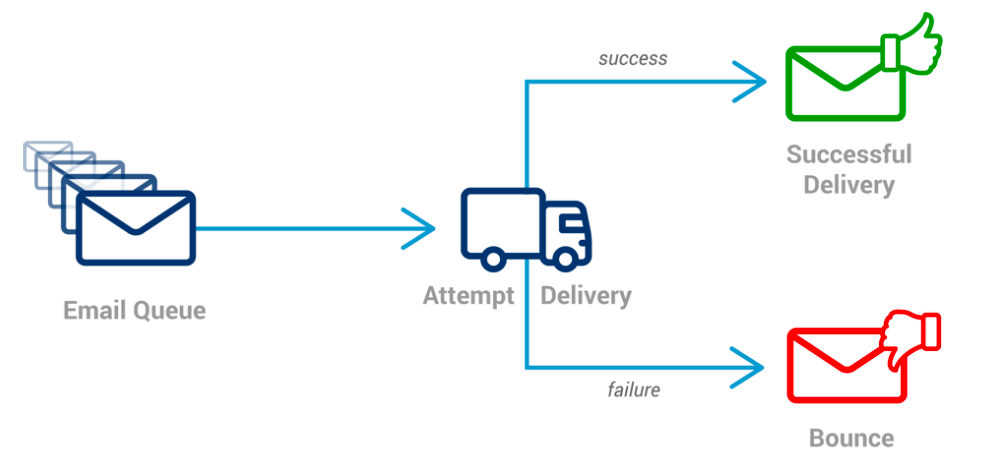
A message failed to be delivered is a bounce. A bounce can occur because of various reasons. Such as the recipient or the domain does not exist. A recipient might be running out of disk space, very common these days with android users where the account is linked to their gmail account storage.
The bounce can also occur because the mailbox provider does not see email as legitimate.
Synchronous vs Asynchronous Bounces
Bounces generally fall into two categories: synchronous and asynchronous. While both types may share identical underlying causes, the primary distinction lies in their timing. Whether the failure is identified immediately or at a later point.
1. Synchronous Bounces (During SMTP)
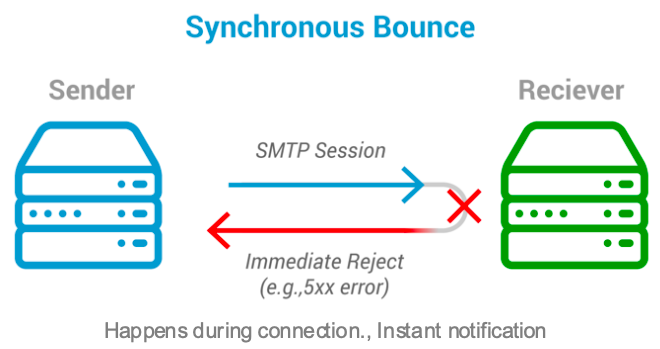
These happen during the SMTP transaction.
- The receiving server rejects the message immediately
- You get an instant SMTP response (e.g. 4xx or 5xx)
- The message is never accepted
These responses can happen at different stages of the SMTP transaction, such as during connection setup, after RCPT, or after DATA.
A 4xx SMTP reply represents a temporary failure (deferral). The message is typically kept in the queue and retried later. A 5xx reply represents a permanent failure where retrying is not expected to help.
But temporary does not mean forever. If a message continues to receive 4xx responses until the retry or queue lifetime expires, the sending server eventually gives up and generates a bounce.
2. Asynchronous Bounces (After Acceptance)
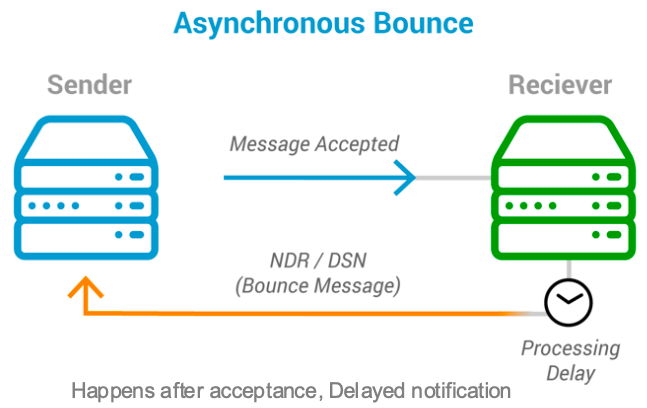
These happen after the receiving server says:
- 250 OK - message accepted
But later…
- The message fails internally
- You receive a DSN / NDR (bounce email)
- The failure is delayed
The reliability of asynchronous bounces can be inconsistent. Because these messages are initially received by the MX, which frequently serves as an anti-spam filter and the successful pass results in the email being forwarded to the next hop where the mailbox resides. If the recipient is missing or if other issues arise, it is this internal relay that subsequently triggers the bounce.
The Big Myth: Soft vs Hard
Through our assessment questionnaires, we frequently encounter a prevailing misconception: that 4xx codes strictly denote soft bounces while 5xx codes always signify hard bounces. The core issue is the absence of a structured framework that accurately defines the distinction between soft and hard bounces.
Let's take a look at real examples that we extracted from over 40 thousands unique bounces in our database in the past 30 days.
- 451 if you know how to handle 4xx you are welcome to try again later.
- 451 4.7.650 The mail server [1.2.3.4] has been temporarily rate limited due to IP reputation.
- 552 Spamming is not a job, it's a crime. You are a criminal. Please, think about your life choices. Your parents would be ashamed of you. Get a real job instead.
Ask yourself: do these examples reveal anything about the intended recipient? Likely not. These notifications stem from various triggers that point toward underlying problems with your sending habits or the reputation of your IP and domain, rather than the recipient or recipient domain itself.
A Better Way: Three Types of Bounces
To move beyond the simple binary of soft and hard bounces, we have established a third classification: "just a bounce." While traditional soft and hard bounces are typically tied to specific issues with the recipient's address or domain, this new category encompasses all other failures that do not fall into those two groups.
1. Soft Bounce (Retryable, Recipient/Domain Issue)
These are some sample recipients and domain level soft bounces.
Recipient level:
- 452 4.2.2 The recipient's inbox is out of storage space.
- 452 <xxxx@libero.it> User quota exceeded.
- 552 5.2.2 <xxxx@icloud.com>: user is over quota.
Domain level:
- 451 Open relay not allowed - https://community.mimecast.com/docs/DOC-1369#451.
- 451 4.4.4 Mail received as unauthenticated, incoming to a recipient domain configured in a hosted tenant.
- 550 Relay not permitted.
Managing these types of bounces necessitates a sophisticated re-engagement strategy. Relying on aggressive retries is counterproductive, as it can significantly damage your sender reputation.
2. Hard Bounce
These are some sample recipients and domain level hard bounces and these are truly dead ends.
Recipient level:
- 550 Invalid Recipient - https://community.mimecast.com/docs/DOC-1369#550 [g1chRA9wOASMClSLvbHPoQ.uk105].
- 554 30 Sorry, your message to xxxx@yahoo.gr cannot be delivered. This mailbox is disabled (554.30).
- 550 5.5.0 Requested action not taken: mailbox unavailable (S2017062302). http://AMS1EPF0000003F.eurprd04.prod.outlook.com.
Domain level:
- recipient address has null MX
- unable to route: no mail hosts for domain
- bad destination system: no such domain
With hard bounces, there is only a single course of action: suppresses these addresses from future mailings immediately.
3. "Just a Bounce" (Reputation / Sender Issues)
The following examples illustrate bounces that are unrelated to the specific recipient address or domain. Notably, these notifications utilize both 4xx and 5xx response codes.
- 550 5.7.28 [x.x.x.x 1] Gmail has detected an unusual rate of unsolicited mail originating from your IP address.
- 457 Too many invalid recipients.
- 550 5.1.1 x.x.x.x is not allowed to send from per its spf record please your spf settings and try again.
- 550 5.7.1 Unfortunately, messages from [1.2.3.4] weren't sent. Please contact your Internet service provider since part of their network.
- 550 5.7.1 [1.2.3.4] Gmail has detected that this message is likely suspicious due to the very low reputation of the sending IP.
Rather than focusing on the recipient, the most effective response involves refining your sending practices and addressing foundational concerns like authentication, list maintenance, content quality, and overall reputation.
When Soft Becomes Hard (Time + retries = decision)
Having defined soft, hard, and ‘just a bounce’ categories, we must address a critical question: at what point does a soft bounce transition into a hard bounce? Even valid soft bounces cannot be retried indefinitely.
Our research indicates that Email Service Providers (ESPs) employ varied strategies; some prioritize retry counts, while others focus on elapsed time. The motivation is driven by marketers. We believe a hybrid approach utilizing both satisfies both marketers and mailbox providers.
Consider an adjusted cadence: if a recipient on a daily mailing list triggers a soft bounce, consider shifting them to a weekly schedule. After 4 to 6 weeks of persistent soft bouncing, the address should be reclassified as a hard bounce. This method reduces the volume from daily attempts to just six emails over the same six-week period.
Relying solely on time-based removal, such as after one week, risks prematurely deleting subscribers whose emails might have eventually been delivered.
Combining retry frequency with time duration provides a balanced strategy that is neither overly aggressive nor excessively slow.
Smarter Bounce Classification in Your MTA
Most modern MTAs allow bounce classifications. These bounce categories do not indicate bounce type but they are more grouping of bounces. Later these can be mapped into soft, hard and 'just a bounce' category.
- Invalid-recipient / bad-mailbox > "hard bounce"
- Quota-issue / relaying-issues > "soft bounce"
- Invalid-domain / bad-domain > "hard bounce"
- Spam-related / policy-related / other > "just a bounce"
Why This Matters
A poor bounce handling may lead to poor sender reputation, lower inbox placement, wasted retries, lost users, and lost revenue.
Good bounce handling gives you cleaner lists, better reputation, faster delivery, higher inboxing rates, and more revenue.
Final Thought
Far from being a hidden technical detail within your application, bounce handling serves as a vital feedback mechanism from the broader email ecosystem. These signals are a reflection of your sending practices; by treating a bounce as an actionable data point rather than just a notification, you can drive significantly better outcomes for your email strategy.
If you want to improve your bounce classification and turn bounce data into better deliverability decisions, we are happy to assist.
There are many more interesting blogs by category for you to read.
Categories
Featured